

It’s happening. FSCrawler 3.0 is out!
If you have never heard of FSCrawler, it’s the little open-source crawler I started back in 2011 with my friend Malloum when we were working at the French Customs. It helps index office documents — PDF, Word, PowerPoint, images, you name it — into Elasticsearch. Think of it as “you know, for files”, in the same spirit as the famous “you know, for kids” which is the source of the Elasticsearch tagline: “You know, for search”.
Version 2.9 shipped on January 10, 2022. Today, August 26, 2026, we release 3.0. That’s 4 years, 7 months, and 16 days of patient (and sometimes not-so-patient) hacking. A teenager release for a project that is itself a teenager!
By the numbers
I ran the git stats between tags fscrawler-2.9 and fscrawler-3.0. It’s… well… a huge amount of work. Here are the highlights:
| Metric | Value |
|---|---|
| Time between releases | 4 years, 7 months, 16 days (~1,689 days) |
| Commits | 2,877 |
| Files changed | 901 |
| Lines added | +56,403 |
| Lines removed | −24,919 |
| Net change | +31,484 lines |
| Codebase size (Java, YAML, XML, docs) at 2.9 | 27,833 lines |
| Codebase size at 3.0 | 59,632 lines |
| Growth | +114% |
| Java only at 2.9 → 3.0 | 23,543 → 44,109 lines (+87%) |
| Human contributors (excluding bots) | 18 |
The contributor hall of fame includes David Pilato (yours truly), Ilian Maciuba, Alex Steele, iadcode, Benjamin Dauvissat, Kevin Trebing, Martin Bussmann, betofilippi, and more. Plus the robots who kept us honest: Dependabot, Mergify, GitHub Actions, and — yes — Cursor Agent. We see you. 🤖
For context, 2.9 was a modest release (Tika 2.2.1, Elasticsearch 7.16.2, a few Workplace Search tweaks). 3.0 is… not modest.
What a difference 4.5 years make
When 2.9 shipped, Elasticsearch 8 was not even there. ChatGPT did not exist. Tika 4 was a distant dream. We still shipped separate FSCrawler distributions per Elasticsearch major version. Docker images required you to pass the fscrawler binary explicitly. Job settings were created implicitly on first run.
3.0 throws all of that out the window — on purpose. This is a fresh install release: there is no in-place upgrade from 2.9. Install 3.0, run --setup, reindex. The upgrade guide walks you through it.
And honestly? The pain is worth it.
Feature spotlight
There are dozens of new things in 3.0. Below are the ones I think deserve fireworks — each with settings or commands you can copy-paste.
One crawler to rule them all: the plugin architecture
The challenge: FSCrawler grew organically. Local filesystem, FTP, SSH — each protocol was wired differently. Adding a new source meant touching core code. It did not scale.
The fix: A unified plugin architecture powered by PF4J. You now pick your provider with fs.provider instead of the deprecated server.protocol. Same job settings, same checkpoint model, same REST API — different backends.
See the crawler provider docs for the full migration guide from server.protocol.
Please note that in 3.1 we will go a step further and deprecate the server namespace entirely. fs.provider is the future. See #2522 for more details.
Writing your own plugin
Built-in providers live under plugins/ in the repository:
fs-local-pluginfs-ftp-pluginfs-ssh-pluginfs-http-pluginfs-s3-plugin
Each one implements the FsCrawlerExtensionFsProvider extension point.
The simplest shape is a REST-only provider (fetch one file, no directory crawl) — think HTTP or S3. Here is a stripped-down skeleton:
public class MyPlugin extends FsCrawlerPlugin {
    @Override
    protected String getName() {
        return "my-plugin";
    }

    @Extension
    public static class MyProvider extends FsCrawlerExtensionFsProviderAbstract {
        @Override
        public String getType() {
            return "mytype";  // used in REST: "type": "mytype"
        }

        @Override
        public InputStream readFile() throws FsCrawlerPluginException {
            // return bytes for the requested document
        }

        @Override
        public Doc createDocument() throws FsCrawlerPluginException {
            // fill filename, filesize, path.real, path.virtual
        }

        @Override
        protected void parseSettings() throws PathNotFoundException {
            // read JSON from REST body, e.g. document.read("$.mytype.url")
        }

        @Override
        protected void validateSettings() {
            // throw FsCrawlerIllegalConfigurationException if settings are invalid
        }
    }
}
For a crawling provider (walk directories), override supportsCrawling() to return true and implement openConnection(), getFiles(), getInputStream(), and friends — see FileAbstractorFile in fs-local-plugin or FsCrawlerExtensionRemoteProviderAbstract for FTP/SSH.
Build your plugin as a Maven module (parent: fscrawler-plugins), package it as a PF4J plugin JAR, and drop it into the distribution plugins/ directory alongside the built-in ones. The FsHttpPlugin is a great ~100-line reference to start from.
Elasticsearch 7, 8, 9 — one binary to rule them all
The challenge: Shipping fscrawler-es7, fscrawler-es8, etc. was a maintenance nightmare. Every Elasticsearch client bump meant N distributions.
The fix: We wrote our own HTTP client for Elasticsearch and dropped version-specific builds. One ZIP. One Docker image. Elasticsearch 7.17, 8.x, and 9.x — including Elastic Cloud Serverless.
A minimal job file with API key auth. It works for Elasticsearch 7, 8, and 9, local or on cloud:
---
name: "fscrawler"
fs:
  url: "/tmp/es"
elasticsearch:
  urls:
    - "http://127.0.0.1:9200"
  api_key: "YOUR_API_KEY"
With start-local, just copy the API key from elastic-start-local/.env.
Apache Tika 4: the upgrade we had to earn
The challenge: Apache Tika 4.0.0 is a breaking release. XML configuration is gone (JSON only). Metadata keys were renamed (X-TIKA: → tk:, ICC: → icc:, PDF permissions use hyphens now…). Our entire test suite screamed.
The fix: We upgraded anyway — because staying on Tika 2.x was a dead end. We documented every metadata key rename in the release notes. We fixed stream handling so caller-owned streams stay open during parsing.
The default PDF OCR strategy is now auto — skip OCR on pages that already contain text:
name: "test"
fs:
  url: "/path/to/data"
  ocr:
    pdf_strategy: "auto"   # default in 3.0; use "ocr_and_text" for the old behaviour
The default chain is unchanged: Tesseract when available. But now you can go further…
VLM OCR: because sometimes Tesseract needs help
The challenge: Scanned PDFs with weird layouts, handwriting, low-quality faxes — Tesseract struggles. Meanwhile, Vision Language Models can read almost anything.
The fix: FSCrawler ships with Apache Tika’s tika-vlm module. Point it at an OpenAI-compatible endpoint via a custom Tika JSON config referenced from your job settings. VLM is opt-in — without fs.tika_config_path, Tesseract keeps doing its thing.
Option A — Ollama (easiest local setup)
Ollama exposes an OpenAI-compatible API on port 11434. Pull a vision model first:
ollama pull qwen2.5vl:7b
Create ~/tika-ollama.json:
{
  "parsers": [
    { "default-parser": { "exclude": ["tesseract-ocr-parser"] } },
    { "pdf-parser": {
        "ocr": {
          "strategy": "AUTO",
          "maxPagesToOcr": 10
        }
      } },
    { "openai-vlm-deterministic-parser": {
        "baseUrl": "http://host.docker.internal:11434/v1",
        "model": "qwen2.5vl:7b",
        "maxTokens": 4096,
        "timeoutSeconds": 300
      } }
  ]
}
Wire it in _settings.yaml:
name: "scans"
fs:
  url: "/tmp/es"
  tika_config_path: "/root/tika-ollama.json"
When FSCrawler runs in Docker, mount the config and reach Ollama on the host via host.docker.internal. Start Ollama before FSCrawler — the VLM parser health-checks GET /v1/models at startup; if Ollama is down, OCR is silently skipped for the whole run.
We recommend openai-vlm-deterministic-parser (temperature 0) over openai-vlm-parser to avoid hallucinations on small vision models.
Option B — jina-vlm via vLLM
jina-vlm is Jina AI’s 2.4B multilingual vision-language model — excellent on OCRBench and document VQA. It is not in the Ollama library today (Jina models on Ollama are embedding-only), but it works with the same Tika config when served through an OpenAI-compatible endpoint such as vLLM:
pip install vllm
vllm serve jinaai/jina-vlm --host 0.0.0.0 --port 8000
Then point the parser at vLLM:
{
  "parsers": [
    { "default-parser": { "exclude": ["tesseract-ocr-parser"] } },
    { "pdf-parser": { "ocr": { "strategy": "AUTO", "maxPagesToOcr": 10 } } },
    { "openai-vlm-deterministic-parser": {
        "baseUrl": "http://localhost:8000/v1",
        "model": "jinaai/jina-vlm",
        "maxTokens": 4096,
        "timeoutSeconds": 300
      } }
  ]
}
Always set maxPagesToOcr explicitly — every OCR page is one VLM request. Full details: VLM OCR docs.
REST API reborn: _document does everything
The challenge: The old _upload endpoint was limited. No delete. No fetch from remote sources. Awkward URL layout under /fscrawler/.
The fix: Meet _document. Upload, fetch, delete — from local disk, HTTP URLs, or S3 buckets. The REST service runs at / by default. Launch with --rest:
docker run -it --rm \
  --add-host=host.docker.internal:host-gateway \
  -v ~/.fscrawler:/root/.fscrawler \
  -p 8080:8080 \
  -e FSCRAWLER_ELASTICSEARCH_URLS=http://host.docker.internal:9200 \
  -e FSCRAWLER_ELASTICSEARCH_API_KEY="${ES_LOCAL_API_KEY}" \
  dadoonet/fscrawler myjob --rest
Upload a file:
echo "Hello FSCrawler 3.0" > hello.txt
curl -F "file=@hello.txt" "http://127.0.0.1:8080/_document"
Fetch from the web and index:
curl -XPOST http://127.0.0.1:8080/_document \
  -H 'Content-Type: application/json' \
  -d '{
    "type": "http",
    "http": {
      "url": "https://david.pilato.fr/index.xml"
    }
  }'
Delete by filename:
curl -X DELETE "http://127.0.0.1:8080/_document?filename=index.xml"
Simulate parsing without indexing (great for debugging Tika):
curl -F "file=@scan.pdf" "http://127.0.0.1:8080/_document?simulate=true&debug=true"
More examples (S3, SSH, FTP, custom IDs, tags): REST service docs.
Checkpoints: the feature I wanted for years
This one is personal. Proper pause/resume with checkpoint persistence has been on my mental roadmap forever. Crawling a large filesystem takes hours. Network blips happen. Laptops sleep. You want to stop on Friday and resume on Monday without re-indexing everything from scratch.
The design is not trivial: track scan progress per directory, persist state atomically, survive crashes, handle Elasticsearch bulk failures, expose control via REST, and still work when --rest is not enabled. I had estimated days and days of focused work — and kept deferring it.
Then coding agents happened. With Cursor and Claude Code, we could iterate in tight loops: write an integration test, run it against TestContainers, fix the race condition, repeat. What would have been a multi-week side project became something we could actually ship in 3.0. The robots helped. 🤖
How it works: FSCrawler saves a _checkpoint.json in ~/.fscrawler/{job_name}/. Progress is persisted every 100 files and on state changes. On restart after a crash, it picks up where it left off.
Monitor the crawl:
curl http://127.0.0.1:8080/_crawler/status
Pause and save:
curl -X POST http://127.0.0.1:8080/_crawler/pause
Resume (or trigger an on-demand run):
curl -X POST http://127.0.0.1:8080/_crawler/resume
Force a fresh reindex (crawler must be paused or stopped):
curl -X DELETE http://127.0.0.1:8080/_crawler/checkpoint
You can also nudge a running crawler without REST — set next_check to null in _checkpoint.json and FSCrawler starts a new scan on the next wait cycle. Network errors trigger exponential backoff (configurable via elasticsearch.retry_* settings); after 10 consecutive failures the checkpoint moves to ERROR state.
Full API reference: crawler control docs.
Kibana dashboard on day one
The challenge: You index documents… then stare at an empty Kibana, wondering how to build your first dashboard.
The fix: On startup, FSCrawler can provision a default Kibana dashboard via the Dashboards API (Kibana 9.5+). Point kibana.url at your instance:
name: "resumes"
fs:
  url: "/tmp/es"
elasticsearch:
  urls:
    - "http://host.docker.internal:9200"
  api_key: "YOUR_API_KEY"
kibana:
  url: "http://host.docker.internal:5601"
This closed issue #2477. Details: Kibana settings.
It comes with a nice default dashboard like:
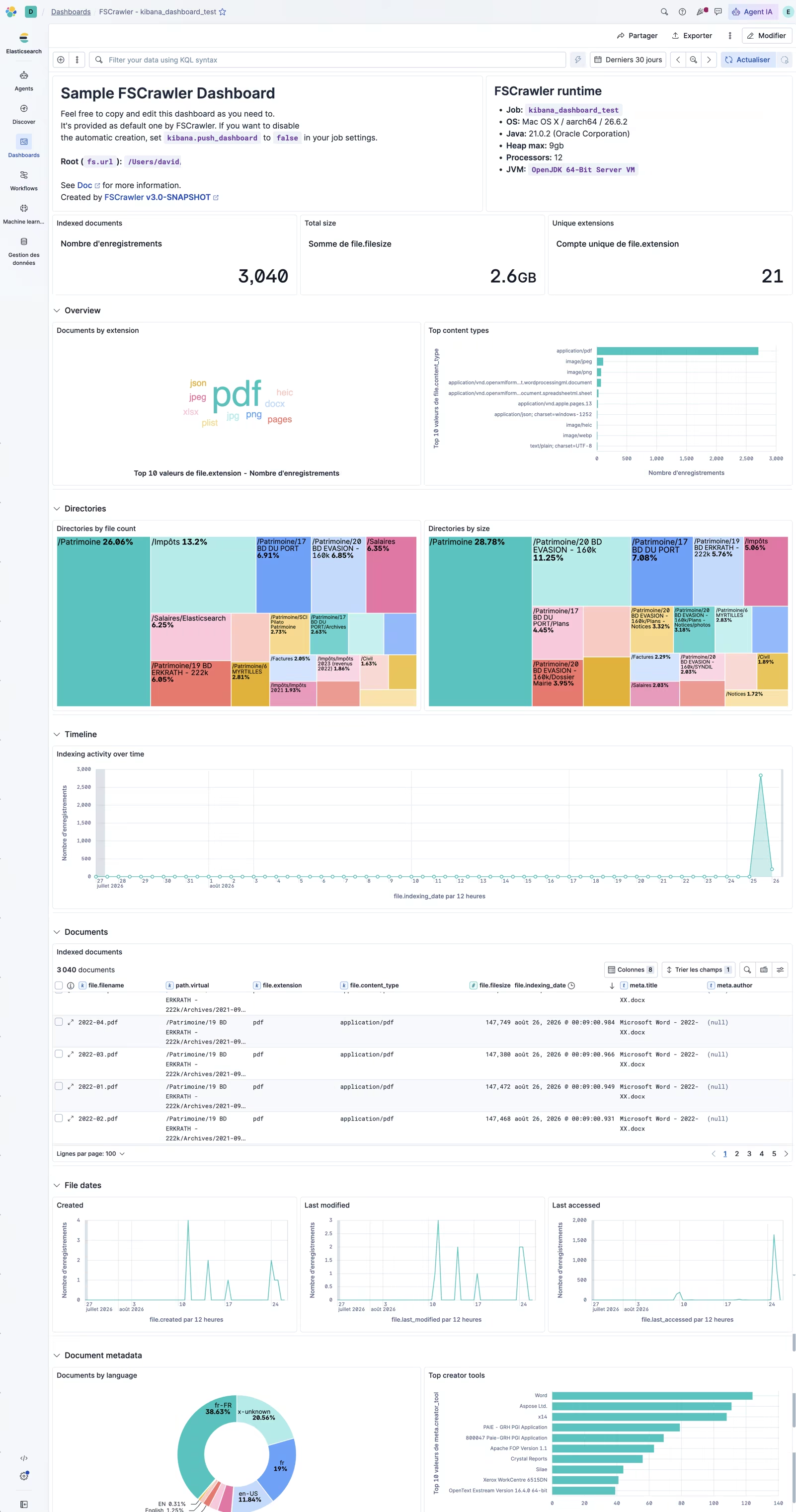
FSCrawler default Kibana dashboard
Semantic search, external metadata, ACL, and the long tail
Quick hits — each links to the docs:
- Semantic search — automatic
content_semanticfield on Elasticsearch 8.17+ with trial/enterprise license. - External metadata — drop a
.meta.ymlnext to your files, or settags.staticMetaFilenamefor job-wide tags. - NTFS ACL extraction — principals, permissions, flags (thanks Alex Steele!). Enable with
fs.attributes_support: trueandfs.acl_support: true. - Environment variables — twelve-factor style overrides (
FSCRAWLER_ELASTICSEARCH_URLS, …) and split settings in_settings/. - External JARs — custom Tika parsers or JPEG2000 support via the
external/directory. - Apple Keynote (
.key) support — closes issue #782, opened in… 2017. Patience pays off. To be honest, it’s provided by Tika!
Try it in 5 minutes (Docker + start-local)
This is the fastest path. You need Docker running.
Start Elasticsearch and Kibana
curl -fsSL https://elastic.co/start-local | sh
cd elastic-start-local
source .env
echo "$ES_LOCAL_API_KEY"
Elasticsearch: http://localhost:9200
Kibana: http://localhost:5601
start-localis for local development only. HTTP on localhost, not HTTPS.
Pull FSCrawler and create a job
docker pull dadoonet/fscrawler

docker run -it --rm \
  -v ~/.fscrawler:/root/.fscrawler \
  dadoonet/fscrawler --setup resumes
Edit ~/.fscrawler/resumes/_settings.yaml:
---
name: "resumes"
fs:
  url: "/tmp/es"
Leave elasticsearch.index unset — FSCrawler creates resumes_docs and a resumes alias.
Index your files
Put PDFs or Word docs in ~/resumes, then:
docker run -it --rm \
  --add-host=host.docker.internal:host-gateway \
  -v ~/.fscrawler:/root/.fscrawler \
  -v ~/resumes:/tmp/es:ro \
  -e FSCRAWLER_ELASTICSEARCH_URLS=http://host.docker.internal:9200 \
  -e FSCRAWLER_ELASTICSEARCH_API_KEY="${ES_LOCAL_API_KEY}" \
  -e FSCRAWLER_KIBANA_URL=http://host.docker.internal:5601 \
  dadoonet/fscrawler resumes
On Linux, --add-host=host.docker.internal:host-gateway lets the container reach services on the host. On Docker Desktop (macOS/Windows), host.docker.internal usually works out of the box — the flag does not hurt.
FSCrawler connects, indexes your files, and — if Kibana 9.5+ is running — creates that shiny default dashboard.
Search
In Dev Tools or via curl:
GET resumes/_search
{
  "query": {
    "match": {
      "content": "elastic"
    }
  }
}
Or in Kibana with ES|QL:
FROM resumes
| WHERE content : "elastic"
Breaking changes (a.k.a. the small print)
I won’t lie — 3.0 breaks things. On purpose:
--setupis mandatory for new jobs (no more implicit config creation).elasticsearch.nodes→elasticsearch.urls— unknown keys are silently ignored, and that burned us during testing._upload→_document- Folder excludes need a trailing wildcard:
/tmp/foo/*not/tmp/foo - Docker no longer needs the
fscrawlerbinary in the command — just the job name. - Tika 4 metadata key renames — update your queries and index templates.
- Default hash algorithm for new jobs is SHA-256 (existing jobs keep MD5).
- Elasticsearch 6.x is no longer tested or supported. It might still work by accident — I would not recommend trying.
Full details: FSCrawler 3.0 release notes.
What’s next?
FSCrawler is 15 years old as a project. 3.0 is the release I wished for when I talked about it in 2022 during my pandemic coding spree.
There is still plenty on the roadmap — and your issues and pull requests shape it. If 3.0 helps you search documents you thought were lost in a shared drive, a FTP server, or an S3 bucket, come tell us on GitHub or Discuss.
Now go index something. 🚀
Documentation: fscrawler.readthedocs.io
Docker image: dadoonet/fscrawler (and dadoonet/fscrawler:noocr if you don’t need Tesseract)
Upgrade from 2.9: upgrade guide