


We saw how to index and search for documents. That is enough to score and filter. Not enough to draw checkbox histograms.
This post is the delta: what you change when you want faceted navigation.
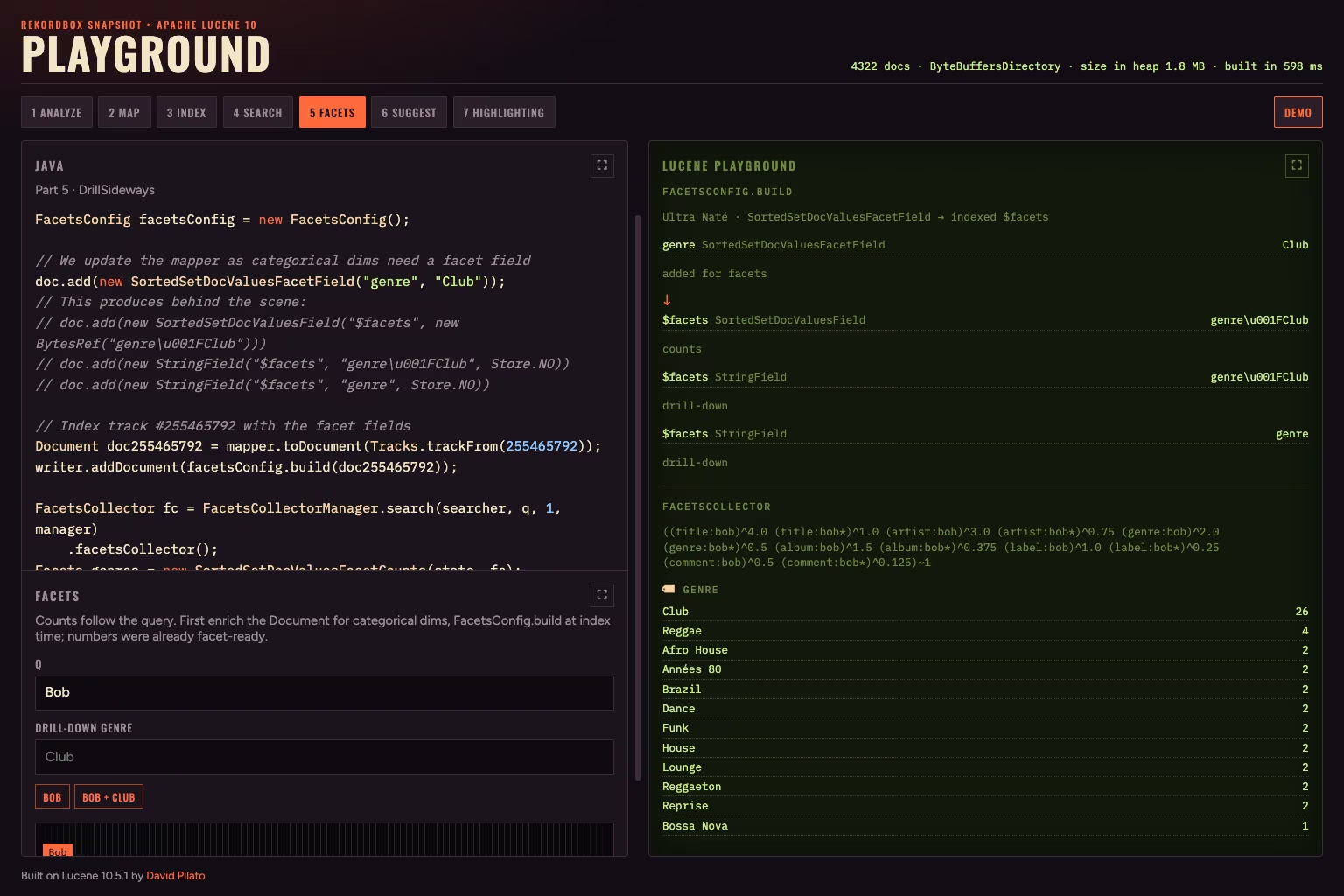
Genre / BPM / rating and year facets for q=Bob.
q=Bob is still the free-text MUST we already saw. The numbers (Club (26), BPM
bins, stars, decades) are facet counts on that same query. Clicking Club
adds a filter on genre for Club.
Add facets to the project
Counts live in their own artefact:
<dependency>
  <groupId>org.apache.lucene</groupId>
  <artifactId>lucene-facet</artifactId>
  <version>10.5.1</version>
</dependency>
Genre checkboxes need a facet-ready label next to the keyword you already
use for FILTER. Do not facet on a TextField — as the tokens produced are
not checkbox labels. For example “Club House” would be tokenized into “club” and “house”,
but you want to group on “Club House”, not “club” or “house”.
We need a FacetsConfig to manage our facet fields:
FacetsConfig facetsConfig = new FacetsConfig();
If you remember the code we were using to index documents for search, we were producing the following Lucene docs:
Document doc = new Document();

// ... All the other fields as before
doc.add(new TextField("genre", "Club", Store.YES));
doc.add(new StringField("genre.raw", "Club", Store.YES));
doc.add(new StringField("genre.raw.normalized", "club", Store.YES));
We now need to add the facet field for the genre field:
doc.add(new SortedSetDocValuesFacetField("genre", "Club"));
Instead of writing the document directly to the writer:
writer.addDocument(doc);
you now pass it through the FacetsConfig.build method:
writer.addDocument(facetsConfig.build(doc));
FacetsConfig.build rewrites the SortedSetDocValuesFacetField fields into the
indexed $facets fields, using \u001F as the delimiter character (DELIM_CHAR):
// You don't write this. FacetsConfig.build(doc) does it for you.
doc.add(new SortedSetDocValuesField("$facets", new BytesRef("genre\u001FClub")))  // counts
doc.add(new StringField("$facets", "genre\u001FClub", Store.NO))                  // drill-down
doc.add(new StringField("$facets", "genre", Store.NO))                            // dim
bpm, rating, and year are already facet-ready.
No extra mapper field, no $facets rewrite:
// Nothing changes for those numeric fields
doc.add(new DoubleField("bpm", 121.29, Store.YES));
doc.add(new IntField("rating", 5, Store.YES));
doc.add(new IntField("year", 1997, Store.YES));
Three different jobs, three different fields:
| Role | Example in the UI | What you use |
|---|---|---|
FILTER | chip genre = Club | TermQuery on genre.raw.normalized (club) |
| Facet label (checkbox count) | Club (26) | SortedSetDocValuesFacetField → $facets + SortedSetDocValuesFacetCounts |
| Numeric range histogram | 120 – 130 (52) | DoubleField / IntField DocValues + *RangeFacetCounts |
Same display string Club for the checkbox; lowercase club only for the
exact FILTER. Ranges never go through $facets.
Query with facets
Same stack as the playground. You do not walk ScoreDocs to draw the panels —
you search once into a FacetsCollector, then ask each facet implementation for
its buckets. Keyword dims need a reader state over $facets first; the search
needs a FacetsCollectorManager to build (and merge) that collector:
SortedSetDocValuesReaderState state =
        new DefaultSortedSetDocValuesReaderState(searcher.getIndexReader());
FacetsCollectorManager manager = new FacetsCollectorManager();

FacetsCollector fc = FacetsCollectorManager.search(searcher, q, 1, manager)
        .facetsCollector();
Facets genres = new SortedSetDocValuesFacetCounts(state, fc);
Facets bpm = new DoubleRangeFacetCounts("bpm", fc, bpmRanges());
topN = 1 is intentional: the hit table is not the point here; the collector
only needs the matching docs so it can count. Rebuild state whenever you open
a new reader (after commit / refresh). bpmRanges() is your DoubleRange[]
(for example 120 – 130) — numeric ranges do not use state.
What comes back is still Lucene’s shape — a FacetResult per dimension, each
holding LabelAndValue pairs (label → count):
FacetResult genreResult = genres.getTopChildren(10, "genre");
// Club → 26, Dance → 18, …

FacetResult bpmResult = bpm.getTopChildren(10, "bpm");
// 120 – 130 → 52, …
getTopChildren(n, dim) keeps the n largest buckets for that dimension.
Numeric ranges use the labels you passed to DoubleRange / LongRange; keyword
facets use the raw facet values (Club, not club).
Map those into beans the UI can render:
public record FacetBucket(String value, int count) {}

List<FacetBucket> toBuckets(FacetResult result) {
    if (result == null || result.labelValues == null) {
        return List.of();
    }
    return Arrays.stream(result.labelValues)
            .map(lv -> new FacetBucket(lv.label, lv.value.intValue()))
            .toList();
}
// Club (26), 120 – 130 (52), ★★★★★ (13)
Same idea for rating or year: another *RangeFacetCounts on the same
FacetsCollector, then toBuckets again.
When a panel is already selected, plain counts on a filtered q would hide
sibling values. That is when you switch to DrillSideways:
new DrillSideways(searcher, facetsConfig, state).search(drillDown, 1);
With a filtered base query
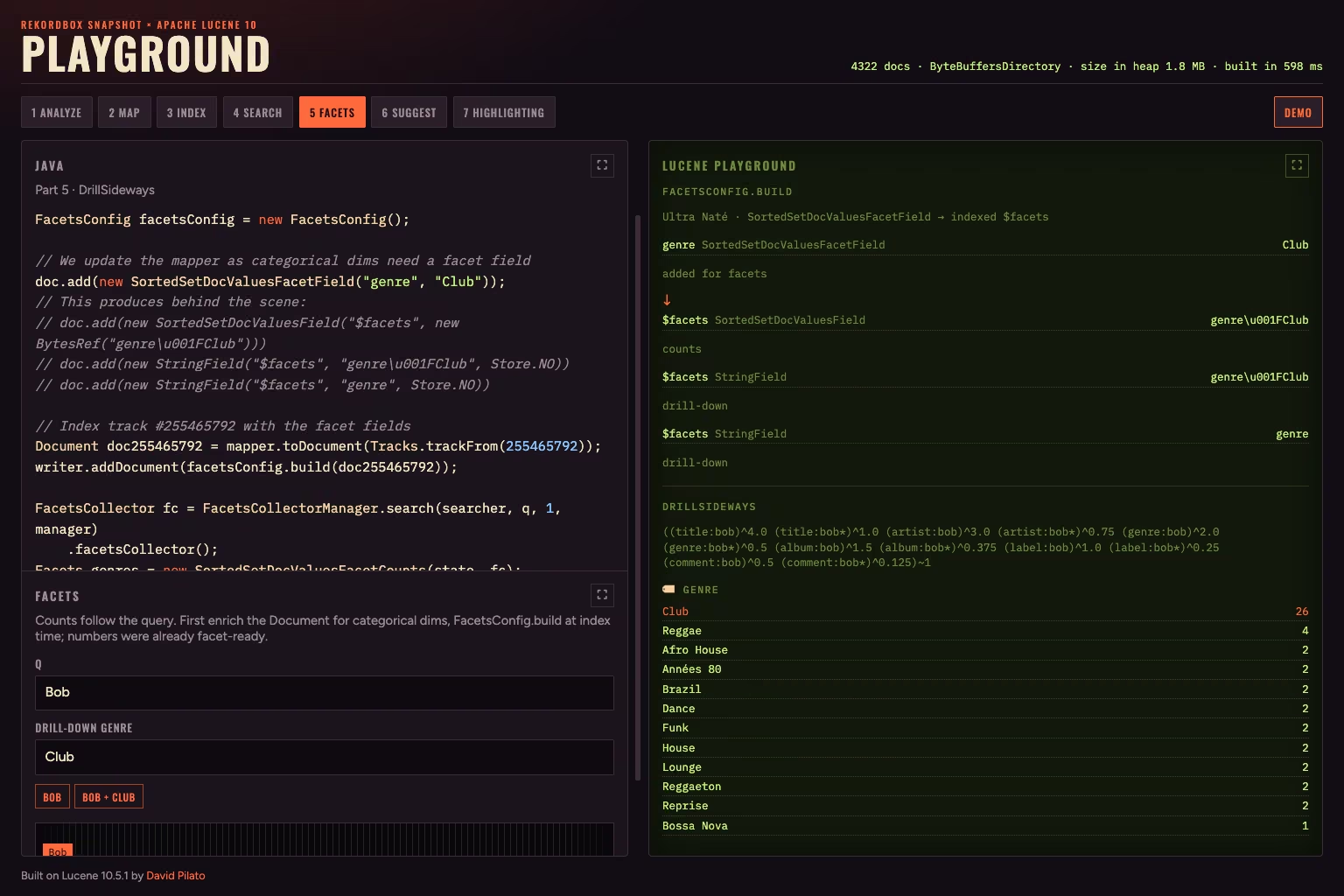
q=Bob + drill-down genre Club — BPM shrinks; other genres stay visible (DrillSideways).
Under genre=Club, the BPM histogram should shrink. The genre panel
should still show Dance — otherwise the user cannot change genre without
clearing the param.
If FILTER genre:Club were already in the base query, Lucene could not drop it
for the genre collector. Split the request:
- Base —
MUSTfree text,MUST_NOTexclusions,FILTERfor other dimensions (bpm, key, …). - Drill-down — each selected panel dim via
DrillDownQuery.add.
Then DrillSideways runs one collector for the filtered set and one per selected
dimension without that dimension’s own constraint:
Query base = new BooleanQuery.Builder()
    // Must match the free text query
    .add(bob, BooleanClause.Occur.MUST)
    // Filter out keys:4a, 4b — other FILTERs (bpm, …) go here too, not genre
    .add(keys, BooleanClause.Occur.MUST_NOT)
    .build();

DrillDownQuery drillDown = new DrillDownQuery(facetsConfig, base);
// genre was not set as a filter as it's a drilldown dimension
drillDown.add("genre", "Club");

Facets luceneFacets = new DrillSideways(searcher, facetsConfig, state)
        .search(drillDown, 1)
        .facets;
The usual e-commerce trick: narrow the table by brand without hiding the other
brands. If you need keywords and numeric ranges on the same collectors, override
DrillSideways.buildFacetsResult and wrap each collector with a MultiFacets.
The full demo lives on GitHub: lucene-search-tracks.